

The Marina Software Buyer's Guide

How It Works
Operational workflow, customer experience, and the daily reality your software has to fit
This is the dimension you feel every shift. Not what the software can do on a feature sheet, but whether it matches the actual choreography of running your marina: assigning slips, writing contracts, checking in transients, launching boats, pumping fuel, all of it from wherever the work happens, which is usually a dock and not a desk.
What "how it works" really means
"How it works" is not a feature question. It's a fit question. Two marinas running nearly identical operations can find the same platform either a quiet help or a daily fight, depending entirely on whether its workflow matches how they move.
The trouble is that fit barely shows up in a sales conversation. Capability is easy to demonstrate ("yes, we do transient booking"). Fit only reveals itself in the small motions repeated hundreds of times a week: how many taps to check someone in, whether the slip map matches your actual docks, whether the thing works with one bar of signal at the end of the pier.

Software you fight every shift costs you more than software you pay a little more for.
So this dimension is judged less by what the software can do and more by how it feels to do the things you do constantly. And the only people who can judge that are the ones who'll actually be doing them.
The buyer and the user see different software
The person buying marina software and the people using it every day are not looking at the same product, even when they're looking at the same screen.
The buyer, usually an owner or GM, is shown the executive view: dashboards, revenue reports, the clean top-level summary. It looks great, because it's built to look great in exactly this meeting. The daily users, your front desk, dockmaster, and harbormaster, live somewhere else entirely: the check-in screen at capacity, the slip map mid-reshuffle, the payment flow with a line forming behind it.
A demo tuned for the buyer can sail right past problems that hit on day one of live operation. The dashboard that impressed everyone says nothing about whether checking in a walk-up transient takes three taps or eleven.
If the vendor only ever demos from a desktop and only shows the executive dashboard, you're being shown the buyer's product, not the user's. Half your team works from a tablet on the dock. Insist on seeing that. If they can't, that's the answer.
This is the practical reason Chapter 1 told you to get your daily users into at least one demo. The harbormaster handling forty transients on a Saturday will notice in ninety seconds what an owner won't see in an hour. A multi-site operator has the same problem one level up: what looks smooth at headquarters can fall apart at the property where staff actually run it.
Chapter 1, Question 2 covers who in your operation should be in the room. This chapter is what they should be watching for once they're there.
The workflows that actually matter
These are the motions a marina platform has to get right. For each one, the test isn't "can it," it's "how does it feel when you do it for the hundredth time this week."
| Workflow | What good looks like |
|---|---|
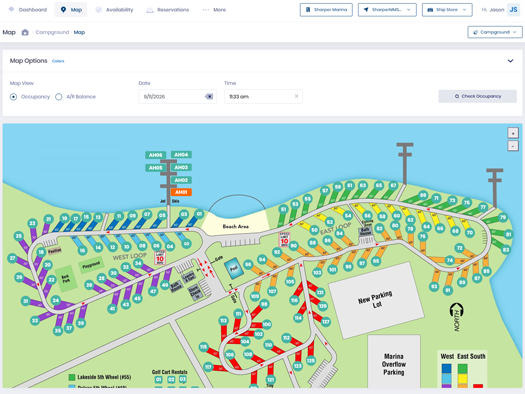
| Slip assignment | A visual map you can drag-and-drop on, that matches your real dock geometry and shows occupancy and payment status at a glance. |
| Contract generation | A seasonal contract for a returning customer in a couple of clicks, not a Word template someone edits by hand. |
| Transient vs seasonal | Both handled natively, with transient check-in fast enough to clear a Saturday rush without a line. |
| Dry stack | Launch scheduling, the retrieval queue, and storage location all tracked in one place, visible to the yard crew. |
| Fuel dock | A metered fuel sale rung up and charged straight to a boater's slip account, not a separate transaction to reconcile later. |
| Mobile and dockside | Full functionality on a tablet, not a stripped-down app, and tolerant of weak signal at the end of the pier. |
| Customer booking | A boater finds availability, books, and pays in under two minutes from a phone, without calling your front desk. |
You won't weight all seven equally. A dry-stack operation cares enormously about the launch queue; a marina with no fuel dock skips that row. Use your top dimensions from Chapter 4 and your modules from Chapter 2 to decide which of these are make-or-break for you.
What to test in a demo
The fastest way to learn how software really works is to stop watching the scripted tour and hand the vendor specific tasks to perform live. Pick the ones that match your busiest, most error-prone moments.
- Check in a walk-up transient and take payment, on a tablet, start to finish.
- Assign a 38-foot boat to a slip when the obvious slips are already full.
- Generate a seasonal contract for a returning customer.
- Move a boat in dry stack and show the launch queue updating.
- Ring a fuel sale to a slip account and show where it lands in billing.
Then hand the tablet to your dockmaster and have them try one cold, without coaching.
How a vendor responds to "show me, live" is itself information. Watch for the difference:
"We'll follow up on that." Switches back to slides. Only one specialist can run the demo. The mobile version is "coming soon."
Does it live without flinching, hands your dockmaster the tablet, and is comfortable when something takes an extra step because they know it still beats what you have.
The hidden cost of friction
Customer experience belongs in this dimension because friction isn't just annoying, it's expensive. The clearest example is online booking. If your booking flow is clunky, a transient who started a reservation gives up and books the marina down the coast instead. You never see the lost booking, so you never count it.
Say 1,500 boaters a year start an online booking with you. A smooth flow completes maybe 75% of them; a clunky one, 55%. That 20-point gap, at an average booking of $90, is:
1,500 × (75% − 55%) × $90 = $27,000 / year
Quietly gone, to friction alone. The figure is made up; the mechanism isn't. Run your own numbers in the calculator below.
Booking abandonment cost calculator
Enter your transient booking volume, your current online completion rate, and your average booking value. See the annual revenue your booking flow is leaking to friction.
Judge "how it works" through the eyes of the people who'll use it daily, on the devices they'll use, doing your real workflows live. The friction you can't see in a polished demo is the friction your staff and your customers will pay for every day.
Chapter 7 picks up customer experience as a revenue lever in its own right. Chapter 11 turns this dimension into three scorecard questions you'll ask every vendor.
How it makes (and loses) you money
The second dimension. Financial management, revenue capture, and pricing: where the software pays for itself, and where it quietly costs you.
Read Chapter 6 →References and further reading
- Sharper MMS, Map the Switch Migration Assessment
- Association of Marina Industries (AMI), industry research and benchmark data. marinaassociation.org
- Storable Marine, AMI, and Marina Dock Age, Navigating the Numbers: 2026 Marina Operator Insights & Technology Automation